
VRapp.co | FAQ
Haal het beste uit ons VR platform. Omdat we met de laatste web-technieken werken, ondersteunen wij de browsers Safari of Chrome.Make een VR tour in 5 minuten!
Op ons universele VR publicatie platform.
Maak voor een optimale beleving gebruik van de laatste versie van Chrome op Windows of Safari on Mac en iOS.
Uploaden van 360° content naar VRapp.co
-
Ga naar VRapp.co en kies login
-
Vul gebruikersnaam (username) en wachtwoord (password) in
-
Kies een VR tour (meerdere VR tours in een gebruikersomgeving zijn optioneel)
-
Voeg titel, korte titel en samenvatting toe.
- De korte titel wordt gebruikt voor de url. De url is daarna niet meer te wijzigen, de korte titel wel). De korte titel wordt weergegeven in de POIs.
- De titel wordt weergegeven in de tour in web-view weergave.
- De samenvatting wordt getoond in de POI en kan HTLM elementen bevatten.
Lees meer
-
Sleep 360° foto’s, in jpg formaat, in het upload kader met een minimale resolutie van 2040×1020 px
- Het toevoegen van 360 videos is ene betaalde optie.
-
Kies upload en het uploaden en verwerken van de foto wordt gestart. De verwerkte bestanden zijn direct zichtbaar in uw VR omgeving.
- Het toegankelijk maken van VR tours en bubbles met ene wachtwoord is een betaalde optie.
-
Kies Clear om een nieuwe upload te maken.
Managen van je VR tours en bubbles op VRapp.co
-
Ga naar VRapp.co en kies login
-
Vul uw gebruikersgegevens in
-
Kies uw gebruikersnaam en kies manage links.
-
Kies de betreffende VR tour om aan te passen (meerdere VR tours zijn een betaalde optie)
-
Wijzig de titel en samenvatting van een tour middels het potloodje
De samenvatting mag HTML elementen bevatten
-
Verander de volgorde van de VR bubbles via de pijltjes in de afbeelding/icon
-
Bewerk de titel en samenvatting van de VR bubble
-
Verwijder een VR bubble. Let op dit kan niet ongedaan worden
Basis navigatie in VR tours
-
Kies Enter VR, om naar het VR menu te gaan. Draai het scherm en plaats de smartphone in een VR bril.
- Zorg ervoor dat schermrotatie aan staat
-
Kijk met de driepoot een seconde naar een icon en selecteer een VR tour in het VR-menu
-
Kijk naar de pijltjes onderin de VR bubble om te navigeren naar een volgende of vorige bubble
-
Kijk omhoog naar het menu icon met logo om terug te gaan naar het menu
-
Kijk naar beneden voor de home knop om terug te gaan naar het begin van de tour
Gebruik Points of Interests (POIs)/hotspots om interactieve VR tours te maken
-
Ga naar admin.VRapp.co en kies login
-
Vul gebruikersnaam en wachtwoord in
-
Kies links in het scherm voor POI editor
-
Kies een VR tour en bubble om interactief te maken
-
Kies Add POI en volg de stappen.
- Gebruik een link POI om een overgang van de ene naar de ander bubble te maken
- Gebruik een text/image POI om informatie of een afbeelding toe te voegen
- Selecteer Audio om een Audio bestand (MP4) toe te voegen. Dit is een betaalde functie.
- Gebruik Dialog om op basis van een gekozen antwoorden de bezoeker naar een bepaalde omgeving te sturen
Digital answers to your virtual questions
What is VRapp.co?
We make interactive virtual reality easy and affordable for your business.
Experiencing VR can be expensive and cumbersome
- Expensive gear or special hardware can be required
- VR gear can be difficult to set up
- On mobile phones often apps have to be downloaded
It’s a hassle to get your VR to the public
- It’s complex and costly to add interactivity.
- To publish content, an app is needed for every platform and VR device, so scalability is low.
- It’s difficult to get real time analytics.
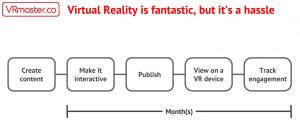
VRmaster provides the number one B2B web service to publish VR content and to distribute interactive VR tours,
so visitors can explore any place or situation in VR. VR tours can be easily created and published to any VR device, smartphone, tablet, desktop or website instantly. In-VR analytics make it possible to analyze behaviour, track reach and interaction, and follow your ROI.
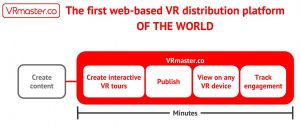
With our web-based VR distribution platform VRapp.co, we want to give businesses a new way of engaging with their customers and stakeholders. A core concept of VRapp.co is the use of VR tours.
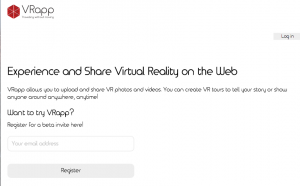
Register for a beta invite
Our VR platform is currently in public-beta, so our users can try out our publication platform for free. You can register on VRapp.co.
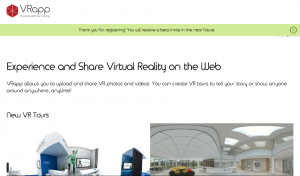
An email will be send to confirm your registration.
We add people as an user a couple of times a week. If you can’t wait, feel free to send an email to hello@vrmaster.co.
VRapp.co terms of services
As soon as you get our invitation, you can start uploading and sharing your VR experiences. By registering as a member or by using the VRapp.co Service in any way, you have to accept our Terms of Service (“Agreement”). This Agreement incorporates the following documents by reference:
We support Safari and Chrome browsers
As we us the latest web techniques, we only support Safari (Mac/iOS) or Chrome browsers. On Windows phones, use the latest Edge browser, but you could run in to some minor issues.
What do I get for free? Free VS Paid plans
The web-based VRapp platform is universal and accessible for free to everyone without any download requirements
Every user receives their own unique url on VRapp.co to which they can upload 360° content. The technology behind VRapp.co then creates VR guides, tours, etc. that can be viewed on any desktop, laptop, tablet or smartphone and shared through the internet. You also can:
- Embed VR content on your website.
- Use one VR tour.
- Navigate by looking at arrows placed on the screen or by tapping the screen.
Our paid features are (see our plans and order your subscription):
- Branded VR environment with your own URL and logo.
- Create multiple interactive VR tours, for example: vrapp.co/your-company/tour1, /tour2 etc.
- Multiple Points of Interests for navigation, information and interaction.
- Option to secure a VR tour with a password.
- Option to secure a VR bubble with a password.
Visit VRapp.co/welcome to see our VR features and check VRapp.co to see the latest uploads by our users.
VRapp works with modern smartphones that run iOS 9 or Android KitKat (and more recent releases). To experience VR video on iOS, you need to choose the Share icon in your browser and then choose Add to Home Screen and use this shortcut to launch VRapp.co. This bug will be resolved in iOS 10, that will be released in September.
What are VR environments, VR tours and VR bubbles?
Every User has his own VR environment wich shows:
- (Company name):
- First name (if company, contact person) Not shown on platform:
- Last name Not shown on platform:
- Email address Not shown on platform:
- Username (max. 17 characters) used in the URL:
- Password (we will give you one that you can change):
- Tagline of the company (aka slogan):
- Summary text of the company (optional):
A VR environments contains VR tours which offer a storyline:
- Title:
- Short title:
- Summary:
ABOUT THE VR Bubble which contains a 360° PHOTO/VIDEO ITEM
- Title:
- Short Title (not visible now, but for future options):
- Summary (optional):
- Tags (optional, it will increase your search ability in the future):
What's a VR tour?

A structure that is fundamental to experiences on VRapp.co are VR tours. A VR tour makes it possible to navigate in-VR through a collection of VR photos, videos or other VR media, representing different places or situations in the tour. Using Points Of Interest (POIs) a user can take different routes through the VR tour, allowing the user to experience different story lines. Examples are exploring different rooms in a house or exploring different situations in a training course.
The advantage of VR tours is that they provide a powerful means of storytelling in a simple way, making the production of VR experiences easy and fast. We will add only those features that provide the highest added value to VR tour design and experience. Example of such features are our VR-menu, interactivity using POIs and displaying dynamic data, such as product pricing, in VR.
What's a VR bubble? aka Sphere, 360° or Panoramic photo or video
What is the maximum resolution of a VR photo bubble on VRapp?
What is the maximum resolution of a VR video bubble on VRapp?
What is the VR-menu?
In VR-view you can choose between the different VR tours in the VR-menu. Aim the tripod on the menu icon and gaze for 1 sec and you will go to the designated tour.

Look at the menu-icon with the logo to go back to the menu.

While visiting the tour, you can use the arrows or points of interest to navigate.


Look at the home icon on the bottom of the bubble to go to the first point of view of the VR tour.

VRapp.co works in Web-view and VR-view.
VRapp.co can be viewed as a normal (mobile) website we call Web-view. In Web-view mode you can easily get an overview of the tours and VR bubbles in a tour. You can share a link bij clicking on the link-icon in the right corner.


Click on the arrow to go to the specific tour or bubble.
How do I set VRapp.co for the screen size of my smartphone?
VR Cardboards, like our own VRmaster, are a simple but effective means to experience VR using only your smartphone. In the process of developing the ultimate experience, various VR challenges cross our real path. The latest challenge that we’ve tackled, will save our users some eye strain, no matter what smartphone they use.
You can set your screen size at vrapp.co.
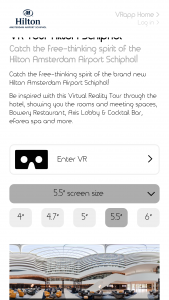
You can measure your screen size with the ruler, printed inside our VRmaster cardboard.
Read more about the screensize and VR in this blogpost.
How to navigatie in Virtual Reality?
In VR-view you can choose between the different VR tours in the VR-menu. Aim the tripod on the menu icon and gaze for 1 sec and you will go to the designated tour.
Look at the menu-icon with the logo to go back to the menu.
While visiting the tour, you can use the arrows or points of interest to navigate.
Look at the home icon on the bottom of the bubble to go to the first point of view of the VR tour.
What are Points Of Interests (POIs aka Hotspots)?
It’s possible to freely navigate to VR Bubbles whitin a VR Tour. When creating a VR Tour, Points of Interest (POIs) can be added wherever you like inside a VR Bubble. A Point of Interest can contains extra information, a picture and a button to go to another VR bubble. Points of Interest are recognized by a small circle. When aimed at it, more information about the concering Point of Interest appears. The viewer then can decide whether to travel to that next VR Bubble or not.
How to use it?
Step 1:
Go to https://vrapp.co/welcome/vr-video-tour
Step 2:
Tap/click ‘Enter VR Tour’ or choose a specific VR Bubble from the VR Tour from the location you would like to start.
Step 3:
Spot the Point of Interest and aim the tripod at it. A textbox with information about the destination behind the Point of Interest will appear.
Step 4:
If you would like to travel to the destination behind the Point of Interest, aim the tripod at the button. Hold it for 1 second and … there you go!

How to embed a VR bubble?
You can add a VR bubble to tour website with our embed code.
- Go to a VR tour/bubble and click on the link icon in the bottom right
- Click on the arrow until you see
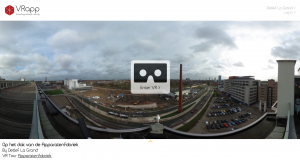
- Copy this url and paste this in the embed code: <iframe style=”border: 0px #FFFFFF none; width: 100vw; height: 56.25vw; min-height: 320px; max-width: 100%;” src=”https://vrapp.co/itch/hangover/in-vr-2?minimal=true” name=”Itch on vrapp.co” allowfullscreen></iframe>
- Embed this code in your website.
Read more about embedding a VR bubble and our minimal mode in these blogposts.
How to share a VR tour?
You can share a link bij clicking on the link-icon in the right corner.
Or use share in the browser of your smartphone.
How to create 360° content.
Creating a 360° photo yourself or together with a professional photographer
Create a 360° degrees photo using:
- Google Camera app (Android) or Google Maps app (iOS). Tip hold the smartphone in the same place.
- Export a spherical 360° from a CAD program like Revit, Autodesk and similar
- Use affordable cameras like the Ricoh Theta S or Samsung Gear 360 starting from € 349.99.
Or make use of a professional photographer like a certified Street View-professionals.
Creating a 360° Video
You can use a Ricoh Theta S or Samsung Gear 360 to create your own 360° video in “homevideo” quality. Contact hello@vrmaster.co to get in contact with a VR video maker near you.
Read more about creating 360° content in this blogpost:

Quick tips VRapp.co on iPhone
- use minimal iOS 9.
- When the Safari browser is in Private mode, you may issue some problems as we use cookies to improve your VR experience. Please visit our Terms of Service and Privacy Policy to learn more.
- Unlock screen rotation.
- We advise to set the Auto lock, screen timeout on never, when using VRapp.co.
Is my iPhone compatible with VRapp.co?
To get the best VR experience,
- use minimal iOS 9.
- When the Safari browser is in Private mode, you may issue some problems as we use cookies to improve your VR experience. Please visit our Terms of Service and Privacy Policy to learn more.
- Unlock screen rotation.
- We advise to set the Auto lock, screen timeout on never, when using VRapp.co.
How can I experience VR Video on iOS with VRapp.co?


How to unlock screen rotation on iOS?

Can I view VR on my iPad or Mac?
To get the best immersive experience, we suggest to use your iPhone and VR goggles to step into VR.
How to change screen timeout (Autolock) time on an iPhone?

Quick tips VRapp.co on Android
- use minimal Android Kit Kat 4.4.2 .
- Use the latest Chrome browser.
- Unlock screen rotation.
- We advise to set the Auto lock, screen timeout on never, when using VRapp.co.
The Android stock browser (on Samsung) is NOT supported.
Is my Android phone VRapp.co compatible?
To get the best VR experience,
- use minimal Android Kit Kat 4.4.2 .
- Use the latest Chrome browser.
- Unlock screen rotation.
- We advise to set the Auto lock, screen timeout on never, when using VRapp.co.
The Android stock browser (on Samsung) is NOT supported.
How can I experience VR Video on Android with VRapp.co?
How to unlock screen rotation on Android?

Can I view VR on my tablet, desktop or laptop?
To get the best immersive experience, we suggest to use your phone and VR goggles to step into VR.
How to change screen timeout time on an Android phone?